Key Takeaways
- The short answer: you make insanely good animation using AI by treating it like an animation film pipeline, not a prompt box. Script first, then character sheets, then environments, then per-angle placement, then motion, then lip-sync and upscale.
- The uncomfortable number: for our 8-minute award-winning film, we generated 1 to 1.5 hours of footage. Only 5-10% of AI generations are usable.
- The real skill: consistency. Locking a character's face, wardrobe, and lighting across 100+ shots is what separates studio work from slop.
- Read time: about 11 minutes. The method is honestly DIY-able. The ceiling is where it gets expensive.
I run an AI film studio, and I'm going to teach you our actual process of animation with AI. Not another list of animation tools. The pipeline.
AI animation is the process of creating animated video with generative AI models instead of frame-by-frame drawing or 3D rendering, and when it's done properly it can hit festival-screen quality at a fraction of traditional animation cost. Done lazily, it produces the plastic, drifting, seven-fingered stuff your feed is full of. If you want to make insanely good animation using AI, the difference isn't which generator you pick. It's the animation process you wrap around the AI technology.
Everything below is the method we used on Unmasked (7 international AI film awards in 2026, including Gold at the Bali International AI Film Festival) and on our stylized 3D animation projects like the Gibbon's Grove teaser. I documented the numbers as we went. Some of them will surprise you.
Why Most AI Animation Looks Bad (and How a Studio Fixes It)
Most AI-generated animation looks bad because creators use AI to generate one shot at a time with no shared visual system. Each generation invents its own character details, lighting, and camera logic, so nothing matches. An animation studio fixes this with reference-locked pipelines: character sheets, environment locks, and per-angle placement before any generation happens.
Here's what I tell every brand that asks. As Karthik, I said this to Moneycontrol and I'll repeat it: AI filmmaking is not just prompt engineering. It's very much like an animation film process. It's very tedious.
The AI tools are genuinely astonishing now. The global AI video generator market is projected to grow from $847 million in 2026 to $3.35 billion by 2034 (Fortune Business Insights). And 87% of marketers already use AI to create content in recurring workflows (Salesforce State of Marketing 2026). The whole animation industry is refitting around this. So why does so much of the output feel dead?
Because audiences can smell one-shot video creation. Consumer comfort with AI in ads actually fell from 57% to 46%, and 57% of consumers worry about fake AI ads (as reported by MarketingCharts). The market doesn't reject the world of AI animation. It rejects slop. Craft is the whole ballgame, which is convenient, because craft is teachable. So let's teach it.
What Is the Process of Animation With AI? The 6-Step Studio Method
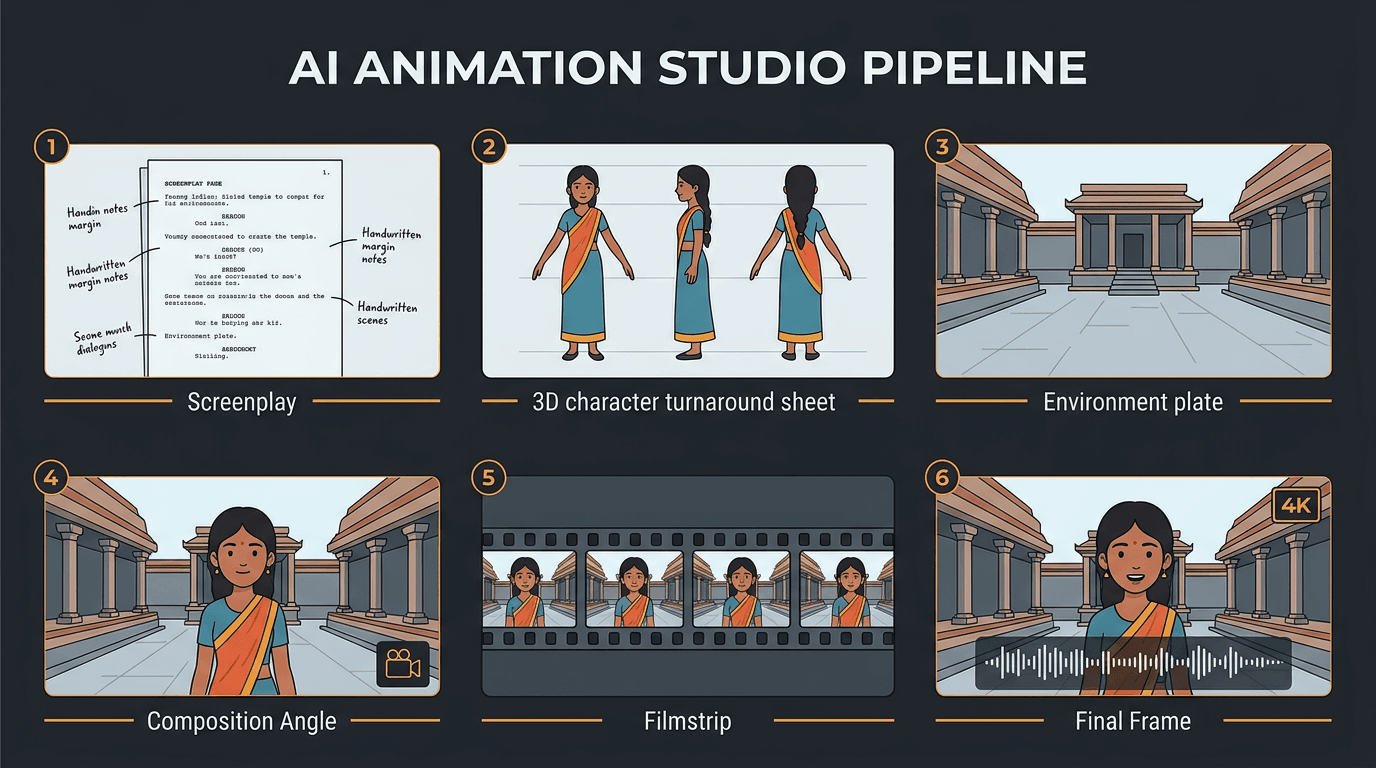
The studio method to make an AI animation runs in six steps: (1) write the script and shot list, (2) build character sheets and turnarounds, (3) generate environments and place characters per camera angle, (4) direct motion in short clips, (5) run the lip-sync and sound pass, (6) fix drift and upscale to 4K.
- Write it like a film. Script, treatment, shot list. 80% of the work happens here.
- Create character sheets and turnarounds that lock identity from every angle.
- Generate environments, then place characters into each scene per camera angle.
- Direct the motion in short 2-4 second generations, and regenerate ruthlessly.
- Add lip-sync, edit, sound and music as production and video editing run hand in hand.
- Run the consistency pass and upscale so no raw generation ships.
This is the exact order we work in, whether the deliverable is a narrative short, an ad, or explainer videos for a product team. Now the detail, step by step, written so a beginner can follow it and a professional can steal from it.
Step 1. Write It Like a Film (80% of Making an AI Animation Happens at the Scripting Table)
Before I used AI to generate a single frame of Unmasked, I spent 20 to 25 days only writing. On a three-month production. That ratio is deliberate. I've believed for a decade that most of a film is made at the writing table, and the power of AI hasn't changed that. Screenplays have to be written by humans. AI can help with research (it cut my research-heavy writing phases from about three months to 10-20 days), but the emotion, the characters, the structure? Yours.
If you want to make animation with AI as a beginner, the practical version looks like this. Write the script. Break it into scenes. Break scenes into shots, each with a camera angle, a character action, and a mood. This shot list becomes your generation to-do list, and it's the single biggest predictor of whether your animated video will feel like a film or a slideshow.
While you're here, decide your animation style and write it down as a style bible: line quality, palette, lighting rules, era, lens feel. One paragraph is enough. Every prompt you write from now on inherits it. That one habit kills half of all visual drift before it starts, in any type of animation.
Step 2. Character Sheets and Turnarounds That Lock Character Animation
The most asked question in the world of AI animation, and the heart of character animation: how do you keep the same face across shots?
You build character sheets before you animate characters at all. Front view, side view, back view, a close-up of the face, wardrobe details. We generate these first, iterate until the character feels right, and then treat those sheets as law. Every later AI image and video generation references them instead of re-describing the character in text. Text descriptions drift. Reference images don't.
Two years ago this required training custom models on dozens of images (the old Flux fine-tuning grind). Nano Banana changed that overnight. Reference-based character consistency went from a weekend of training to feeding your sheets directly into the animation generation, and as of mid-2026, reference-driven models like Seedance with omni reference have made it the default workflow. Our animation production runs on consistent character universes built this way, with face, style, and lighting locked per character. The Gibbon's Grove teaser, our stylized 3D piece, holds its look shot to shot because the characters existed as locked references before scene one was generated.
If your AI animated character's face is changing between scenes, you skipped this step. Go back. There is no post fix that beats a good turnaround sheet. (I wrote a whole technical piece on stopping face and style drift if this is the specific dragon you're fighting.)
Step 3. Build Environments, Then Place Characters Per Camera Angle
Here's the part almost every AI animation tutorial skips, and it's the step that makes professional animation work look shot rather than generated.
We generate the environments and scenes as their own assets, separately from characters. The temple courtyard, the neon alley, the forest clearing. Then, for each shot in the shot list, we place the locked character into the locked environment from that shot's specific camera angle. Low angle for menace, over-the-shoulder for dialogue, wide for geography. One scene, many angles, all matching, because the environment was generated once and reused.
This is also where seed discipline lives. A seed is the number that sets a generator's starting noise pattern. Lock it, and layout, lighting, and style stay stable across variations of the same setup. Change it deliberately, not accidentally.
Why bother with all this instead of prompting "girl walks through temple, cinematic"? Because coverage is what editing needs. A film cuts between angles of the same coherent space. A prompt box gives you a new space every time. Diffusion models (the AI technology under nearly every current generator, having largely replaced the GAN era) are brilliant at inventing. Your job in this step is to stop them re-inventing.
Step 4. Direct the Motion, Then Generate (and Regenerate)
Now, finally, animation. You animate images, not paragraphs: take the placed character-in-scene frame and use AI to generate an image-to-video clip, directing movement the way you'd direct an actor. Small, specific, intentional. This is where AI in animation stops being a toy and starts being a camera department.
The craft rules we follow to make the video look intentional, learned expensively:
- Keep generations short. 2 to 4 seconds. A long video clip destabilizes.
- Prompt subtle camera moves. A slow push-in reads premium. High motion settings read broken.
- Direct performance in beats ("she hesitates, then turns"), one beat per clip.
- When a model fights you, change models, not adjectives.
And budget for wastage, emotionally and financially. For our 8-minute film I generated over an hour of footage. Only 5 to 10% of AI generations are usable. The model will invent new characters, pan the camera on its own, or break physics, and you regenerate until it doesn't. The climax VFX effect in Unmasked runs 15 to 20 seconds on screen. It took 150 to 200 generated clips. That's not inefficiency. As of mid-2026, that IS the medium, and knowing it going in is what keeps you patient while you create animation this way.
One more studio trick: motion capture transfer. My wife is a classical dancer, and her performances drove the AI mocap dance sequences in Unmasked. I performed the action beats myself. Real human movement, style-transferred into the film (neural style transfer's scrappier production cousin). If a motion matters, act it.
Step 5. Lip-Sync, Edit, Sound and Music (Where Half the Quality Lives)
Nothing screams AI slop like mismatched lips. On Unmasked we ran a dedicated lip-sync pass using a combination of 3 to 4 lip-sync models, with temporal tracking so faces stay consistent while mouths move. One model rarely nails every shot. We route each shot to whichever handles it best.
Voice was its own puzzle. Video models were trained mostly on Western speech, so Indian-accented dialogue kept coming out robotic. The fix: I dubbed the lines myself with the emotion I wanted, then used ElevenLabs and Hume to build the character's voice and style-transfer my delivery into it. Human performance, synthetic timbre. If you're animating dialogue in any non-Western accent, steal this technique.
Music: I composed the score in about a week using Suno, leaning on my Carnatic classical training to pick the raga and set the BPM to the edit's pacing. You don't need my background. You do need to choose music against your actual cut, not against vibes.
Which brings up the deepest workflow difference from traditional animation and live production alike: with AI video creation, the edit and the generation happen hand in hand. You cut as you generate. When the edit exposes a missing beat, you go back and "shoot" again the same afternoon. No location, no crew call. Using artificial intelligence this way collapses the distance between production and post, and it's the single biggest creative advantage the medium has. Great animation gets found in that loop.
Step 6. The Consistency Pass and the 4K Upscale
Last pass before anything ships: hunt drift. Play the cut and watch one element at a time. Costume across shots. Skin tone across lighting setups. Props that teleport. Then regenerate or repair the offenders, and finish with upscaling models for a custom 4K master so the texture holds on a big screen. AI can help streamline even this stage, but human eyes make the calls.
Our studio rule is blunt: no raw AI artifact goes unpolished. We don't ship raw generations. This pass is boring, and it's also exactly where "pretty good for AI" becomes high-quality animation someone mistakes for a bigger budget.
The AI Animation Tools We Actually Use (Mid-2026)
People keep asking for the best AI animation generator. The honest answer from production: a custom multi-model stack, not a single prompt box. As of mid-2026, ours looks like this. Seedance with omni reference has been the workhorse for character and style-consistent AI animation generation for the past six months or so. Around it: Kling 3, Veo, Nano Banana for character consistency, Seaweed 2, Hailuo, and Runway, each picked per shot for what it's best at. Voice and dubbing run through ElevenLabs plus our multi-tool lipsync pipeline, and music through Suno alongside original composition. Video editing still happens in a normal NLE, like any film.
A warning from someone who has rebuilt this stack yearly: the workflows we created in 2024 did not work in 2025, and the 2025 workflows are not working today. Our ComfyUI-era animation software setups are obsolete. Whatever list you read (including this one), verify it against the current model lineup before building on it. Choosing the right AI tool is a per-shot decision, not a loyalty program, and the right AI for dialogue is often the wrong one for physics.
Which Type of Animation Should You Make With AI? 2D, 3D, and Explainer Styles
AI handles different animation styles with different success rates. Stylized 3D and painterly looks are the current sweet spot, 2D animation and anime-style work well with strong reference discipline, and simple motion-graphic explainer videos are the easiest entry point. Photoreal humans remain the hardest, because viewers spot facial drift instantly.
A quick map of the territory, since choosing a style before you generate saves enormous rework:
- Stylized 3D (our Gibbon's Grove lane): most forgiving, most cinematic per rupee.
- 2D animation and flat vector looks: excellent for brand explainer videos and online animation content, and the fastest basic animation to iterate.
- Anime and cartoon aesthetics: very achievable, though an AI cartoon generator without reference locks will drift wildly. I covered the anime-with-AI workflow separately.
- Photoreal humans: possible (Unmasked proves it), but this is where animation requires every step of the pipeline above at full discipline.
Newer animation models blur these lines every quarter, so give the stranger hybrid styles a try once you've shipped something simple. Whichever direction you take, the pipeline stays identical. Only the style bible changes. And if you're deciding between styles for a specific animation video with real money attached, that's exactly the conversation our AI animation studio has with clients every week.
How Far Can Free AI Animation Tools Take a Beginner?
Free AI animation tools are genuinely good for learning the workflow, and most major platforms offer free plans with watermarked, limited generations. Animation for beginners can start there: practice character sheets, seed locking, and short-clip motion without spending anything. The ceiling arrives at consistency across many shots, lip-sync quality, and resolution, which is where paid tiers and studio pipelines begin.
I'm pro free options, sincerely. My first sci-fi short cost under $75 and screened at Comic Con Hyderabad, so I will never tell a beginner that budget is the barrier to a good animation experience. Nearly every major video generator offers a free tier of some kind, and every step above works at small scale when a platform offers a free plan. You can create animated videos using nothing but free tools and patience, and you'll build real animation skills doing it. Learn there.
Where the DIY ceiling actually sits, honestly:
| Free/DIY animation tools | Studio pipeline | |
|---|---|---|
| Single stylish shot | Absolutely achievable | Same, faster |
| Character identity across 50+ shots | The wall most people hit | Locked via sheets and reference models |
| Dialogue and lip-sync | Basic, often uncanny | Multi-model pass with temporal tracking |
| Wastage tolerance | 10 usable seconds may cost hours | Budgeted: 150-200 clips per hero effect |
| Finish | 1080p with artifacts | VFX-grade cleanup, custom 4K upscale |
And a cost-reality note, because "AI makes films free" is a myth I keep correcting: AI collapses production cost, not creative labor. A Baahubali-scale idea drops from a Rs 500 crore budget to maybe Rs 5-10 crore, not to Rs 5 lakh. Writing, direction, video editing, sound, and taste remain human work that takes months. That's the honest math behind professional animation of any kind, and it's why the potential of AI is a multiplier on craft rather than a substitute for it.